The struggle of resizing windows on macOS Tahoe
(noheger.at)2683 points by happosai 2 days ago
2683 points by happosai 2 days ago
Yea, the programmers aren’t to blame here. In fact some of the visual effects they have achieved are pretty cool. The designers are at fault because they prioritized visuals over usability. Literally nobody I know thinks “Liquid Glass” has been an improvement. The feedback is universally negative.
And it's the UX designer's job to specify the click target area based on best practices and usability testing with real users.
If this is the click target area specified by the designer (or it was simply unspecified) then it's absolutely the designer's fault. I'm a UX designer and I've made mistakes like this before, though this one is pretty egregious because the issue is core to the interaction.
It's sometimes easy as a UX designer to forget to specify some of the smaller details (though this example isn't what I'd call a "small detail"), particularly because they're the kinds of things you don't notice when they work, and I don't have to implement it. The developer has to sit down and write code for what will or will not happen.
I've made mistakes in the past where in an mobile interface I neglected to specify the click target area for some controls. Typically the minimum clickable area we'd use was something like 44x44 but the visual was smaller than that, and I didn't specify it, so the developer made the visible element the one that would respond to the click events. It was too small and it caused issues. I owned up to that one, I didn't want to let the developer take the blame for that.
I've also been fortunate enough to work with developers who would notice these things and then ask me if it was intended and whether they should increase the clickable area. I was always so grateful to have colleagues like that, and I'd always offer to set some time aside to come take a look at things on their local environment before they moved things forward just to catch any issues where they could immediately fix it instead of having to push fixes later on.
I don't know where the failure happened at Apple, but based on what I've seen from "Liquid Glass" it's clear there's some real institutional failures involving either the design leadership, the development leadership, or somewhere in between both. It's really quite embarrassing the quality of GUI and UX that has come out of Apple recently.
This is the first time ever where the hurdle of rolling back my iPhone to an earlier version of iOS feels worth the effort. I disabled as much of the liquid glass effects as I could because I found it difficult to read and now it all looks like shit, whereas before I could read it and it looked nice.
In this specific case, yea, the programmers might be at fault, but most of my gripes with Liquid Glass are not like this. They are design issues. This seems like maybe more of a bug stemming from an underlying design issue (corner radius being ridiculously large).
> The designers are at fault because they prioritized visuals over usability
I bet designers aren't at fault here either because Liquid Glass violates at least three rules of design every second that passes.
https://www.vitsoe.com/us/about/good-design#good-design-is-i...
Instead OP mentioned "visual artists"; I agree. Liquid Glass is an art show; something that belongs in the realm of concept cars, not on the road.
The worst part here is that the style works decently on mobile but they shoehorned it onto a 25-year-old UI and shipped it.
I'm fond of saying that most problems in the software world are due to one thing trying to do two things, or two things trying to do the same thing. In this case, it feels like the former: getting the same implementation to cater to both desktop and mobile is obviously the most efficient solution from a development perspective, but not an end user (and ultimately business) perspective.
Because they absolutely can't have disparate visual styles in their product lines, practicality be damned ¯\_(ツ)_/¯
I hate it too, but to my surprise, all of my colleagues (with an iPhone) said they love because it looks great.
I’ll add a third perspective that’s probably often gone unsaid: I love it on Apple TV, and kinda like it on iPhone and Mac. It definitely needs to be improved though. There are definitely a whole bunch of usability issues, but they shouldn’t be too hard to fix. And Apple has shown willingness to iterate until they get it right. Unlike Microsoft which just moves onto the next thing (the system settings UI design in Windows 11 is fine.. but can they pleeeease just integrate all settings into that UI now.. how many generations of settings / control panes are there in Windows now?)
The huge corner radius is one thing I do wish they reverted in Mac OS.
I've met some great designers as well. They usually come from more modest backgrounds.
It's kinda the rule for programmes too.
The ones that went to a small liberal arts school you've never heard of programming as their second career are usually more effective to work with then the Stanford/MIT crowd.
The problems start I think, when you have an expectation that your collaborators are somehow either superhuman or subhuman and not peers.
Humility and mutual respect gets things done.
Apple designers used to build interactive demos in Macromedia Director, so I'm assuming they knew a bit about scripting. That probably helped them think in a way that really clicks with software development.
I've worked with some younger designers who couldn't even put together a consistent click-dummy once the client wanted to see flows outside the happy path. To be fair, all they really had to go on was their education and Figma's panels.
This is a pretty discriminatory comment that I’ve honestly seen zero hint of in reality. And this is coming from someone who didn't go to a particularly prestigious school. I honestly rarely even find out what school my colleagues went to school. But the ones I know who did go to those prestigious schools are beyond humble.
Not really. That's bad faith. I've worked at lots of places, probably hired about 200 engineers over my career so far and have noticed this pattern.
I stopped looking at the educational background years ago in a fear that it would influence my bias either way. We shouldn't base someone's suitability at 40 upon what opportunities they were afforded at 17.
I do have a somewhat prestigious pedigree btw. I removed it from my resume around 2010 and never looked back
> I swear, this reign of visual artists as dictators has to stop.
> I'm sure people noticed this issue internally and brought it up but some thing by some designer was seen as biblically sacred and overruled all reason.
Funny how Apple went from Jony Ive sacrificing hardware usability for "beauty" (touch bars and butterfly switches) to Alan Dye mucking up macOS and iOS with Liquid glAss.
The Touch Bar implementation sucked but I'm going to defend that attempt 100 out of 100 times. If Apple didn't remove the function keys I think it would have been a hit feature. There wasn't proper commitment to the feature.
Full agree. The TouchBar was a genuine innovation that gave new ways to interact with data and context. But without the function keys (and the real ESC) there were frequent accidental touches on the bar and a real tactile loss for existing function key intuitions. And now an extremely rare, genuine, programmable HCI innovation is scuttled because of an unthought-thru roll out. A missed opportunity. (I keep my 2019 MBP with the good keyboard largely for this, but ultimately the laptop was ruined by the super hot Intel cpu, which also makes the touch bar uncomfortable to use at times.)
Bret Victor being behind the touch bar explains so much about its potential. Apple has such a weird track record of releasing really interesting stuff that they let languish without enhancement. And then you have weird episodes where they have too much conviction on the wrong things, like the butterfly keyboard, where they release multiple iterations which all end up failing.
I worked for a company with a large website. The designers were elite and worked in a darkroom on expensive Apple equipment. At some point, it turned out that users couldn't see a certain color on the website because it could be seen on an Apple monitor, but not on a mass-market laptop's TFT screen.
I have difficulty reading the light gray text on white/bright background that too many sites favor these days. I have a pretty good 4K 32 inch monitor. Even with a full Adobe color space capable and calibrated device in a darkroom I don't want to read that combination.
I don't get it, I have medically tested 120% color vision (it was a lengthy test), definitely nothing wrong on my side, so I don't understand at all what the designers and coders are seeing that they think that that is a great idea. The difference between the pixels is objectively bad, one can take a screenshot and look at the background versus text pixels.
I worked at a really large social media company, and there was a design which looked beautiful on all of the employee's high-res screens and monitors but used too much space and just didn't work for most of the users. It never got launched, which feels like what should have happened here.
To be fair to those designers, color reproduction is a really hard problem, and shitty monitors have terrible color reproduction.
You want your designers to have accurate color reproduction for obvious reasons, but they should be testing their work on shitty monitors, too.
> You want your designers to have accurate color reproduction for obvious reasons
I don't know, I conclude the opposite. If you need accurate color reproduction when you publish online, you are doing something wrong.
I used to co-own a small digital printing business, so I'm aware of what all of it means, and I had an appropriate monitor myself and a paid Adobe Design Suite subscription.
But for the web, when our setup is too good it's actually a detriment. It is predictable that you end up publishing things that require your quality setup. There is a good reason not to bother with a high quality monitor usable for serious publishing and photo/video editing when you only do web thing. Which is exactly why when I bought my last monitor, which is for business work and coding and web browsing and other mundane things, I deliberately ignored all the very high quality displays, even though the company would have paid whatever I chose. It is not an advantage for that use case.
It's tricky because you're now cropping into rectangular apps which may actually use all the pixels they get and want hit testing in them.
When Windows went to a 1 pixel border and shadow effects, it still had hit testing in a region around the window to account for that. No idea what they're doing with rounded corners in Win11.
Your comment reminded of these fantastic sketch.
The Expert (Short Comedy Sketch) https://www.youtube.com/watch?v=BKorP55Aqvg
I want OS vendors to stop prioritizing "design" above performance. Opening a Finder window used to be instant, now it takes 0.3s-1s. Opening Safari used to be instant, now it takes seconds. Even menus in the menu bar take a few dozen milliseconds too long, which becomes obvious when you compare it to apps with custom truly-instant hamburger menus.
Computers are faster than ever, every task other than UI rendering is finished faster than ever, but these geniuses keep slowing down the UI with every update. It's criminal.
In my experience, part of the problem lies in visual artists not wanting to iterate the way software development does. Sure, they might iterate on the design as they work on it, but once they've found their final design, they strongly resist changing it, even as the actual development and testing of the software to implement it iterates and finds problems.
It's a throwback to BDUF.
that’s a lot of words to say “bad at their job”.
If they aren’t willing to try out their design and find issues with it, or be open to feedback from others, they’re incompetent.
Looking at the non-tech people in my life, exactly ONE had a positive initial reaction after installing ios 26. Do these people at apple not do “normal” user testing?
>I'm sure people noticed this issue internally and brought it up but some thing by some designer was seen as biblically sacred and overruled all reason.
I disagree. Seems more like the group that implemented border radius at the OS UI implementation level did not work with the group that handles window sizing. Not everything is a conspiracy.
Of course it's not "a conspiracy", but it is a major, gigantic, huge, alarming failure by Apple. Resizing a window is just about the most basic and useful thing a window system can do after opening a window, and Apple totally messed it up. It's like they've never worked with a window before, but TBH though, their window system has always sucked.
That’s not a bad thing (user experience is important) but remember that Liquid Glass was designed by someone without a UI background. Alan Dye designed the boxes iPhones come in and was installed by Jony Ive, an industrial designer. Neither of them had training or experience in usability, and all of the UX people I know are basically complaining non-stop about how many basic UX principles the 26 releases violate.
Wasn’t Jobs the one that set that dynamic up, where Ive was basically the #2 at Apple? It seemed to work as long as Jobs was there as the final quality filter.
Yep, Jobs knew what he wanted and he generally had good taste. He would push everyone until he got what he thought was right and spend extra to get it. Supposedly he sent the original iPod team scrambling to find a new headphone jack just before launch because he didn’t like the mushy tactile feel of the jack they had selected. He wanted a very tactile “click” as the headphones snapped in.
I believe the heavy sarcasm is completely justified, I second it.
Most of the software creeping towards complete unusability devolve through non-practical apparence tweeking bullshit, ruining usability, while the functionality is intact (apart from bugfixes).
The other reason for decay is the overcomplication - pilin new and new marginal things on the top of the functionality heap - combined with sloppines, rushing through things, but that's an other discussion.
Did we reach a peek in software quality recently? So things only go down from here? I have this growing itchy feeling. I feel obstructed, forced to jump hoops, also disgust touching an increasing amount of software, most of those used for many many years without trouble (i.e. did not really registered its usage, it was doing things silently and well, but now starting to jump into my face or kick my legs).
Compare to Aqua and Platinum where every resizable window/pane had a big square drag target clearly labeled as such with some diagonal lines:
https://guidebookgallery.org/pics/gui/system/managers/filema...
https://guidebookgallery.org/pics/gui/system/managers/filema...
It also - as seen in that screenshot, had large, always visible scrollbars where it was easy to see how far down you were in a folder or document, and could easily click and drag to scroll to where you needed. Now in the service of minimalism we have scrollbars that consist of a thin, semi-transparent line that fades out after half a second and is nearly impossible to click and drag due to how small it is.
The scrollbar thing is a more widespread mess. I've seen plenty of apps (cross platform) which hide the scrollbar as a tiny grey bar only visible when scrolling. Which on some TN panels is neigh invisible... If I can't see the scrollbar there is no additional stuff to read. I'm now pretty sure this is apple's bad design leaking though to the rest of the world.
> Now in the service of minimalism we have scrollbars that consist of a thin, semi-transparent line that fades out after half a second and is nearly impossible to click and drag due to how small it is.
You can make them always on still. I've done so ever since their disappearing act started. It's not even much hidden, it's in the "Appearance" setting pane.
They're still too small and too light. Some times when a document is big enough I'm actually not able to find the scroll thumb on macOS Sequoia. Some times wiggling the scroll thumb around by scrolling slightly back and forth with my mousewheel/trackpad helps to make it visually appear, but other times I just have to give up.
The default modality changed.
Classic Macs were designed for the mouse or trackball. Modern Macs are designed for multitouch scrolling. When it's easy to get the scrolling infrastructure on demand, the desktop might not need the same click-first affordances.
You're missing the fact that the scrollbars also indicate where you are in their range, which is important regardless of how you do the scrolling itself.
Sadly, this doesn't restore the 'resize box', you just get scrollbars ending in a weird curve.
The scroll bars for those curious: https://imgur.com/a/uhVO8IA
> Now in the service of minimalism we have scrollbars that consist of a thin, semi-transparent line that fades out after half a second and is nearly impossible to click and drag due to how small it is.
This is endemic now. Cinnamon does it by default and I hate it. I only managed a partial fix, and then I had to do more work per-app (especially Firefox) to make them behave.
In the Aqua image the big bright blue scrollbars stand out far, far more than the content. That sucks, honestly. So does the percentage of the screen dedicated to their presence.
Also, horizontal scrollbars suck. One thing later versions of Finder did well was adjust columns to minimize the presence of them.
We just don't need UI that big anymore. These days our cursors are much more accurate, from the magical Mac trackpad to high DPI optical mice, and we're 40+ years into GUIs so the limited number of people who opt-in to a full computing experience can already be expected to know the basics.
Yes Tahoe sucks, but going back to Aqua or classic MacOS would also suck, just in a different direction. If you actually spend time using classic MacOS and Aqua these days, man is it frustrating to get basic things done. Everything is so slow and you're constantly resizing windows to see whats in them. I own several Macs from the 80s-00s and they are really in need of many quality of life updates that later MacOS revs added. On a modern Mac, enabling 'show scrollbars' gets you to a pretty optimal Finder experience, minus all the stupid Mac bugs and Tahoe nonsense like this article points out.
Hard disagree with all of this. I feel like I am constantly lamenting the simplicity and usability of old scrollbars and cursing their will o the wisp modern implementations.
Scrollbars used to be invisible to me. They only bubbled up to my consciousness when I needed them, and then there was no friction in their use. Now I am having to think about them constantly. To me that is 'standing out'.
I actually don't think there's anything wrong with horizontal scrollbars, as long as you're using an input device (like an Apple trackpad) that makes it equally easy to scroll either axis.
It should be noted the drag handle was removed back in Lion. And the square cutout was removed in Panther, both of which were iterations of Aqua.
(and yes Lion was garbage, first upgrade I skipped since Tiger, and definitely the first "what the fuck are they doing").
Note that downside: you could only resize from that bottom right corner, not from any other edge!
I do think that was better overall, and it's something I miss about Snow Leopard, but I can see why they changed it.
I don't see what's wrong with both, or even whatever combination you choose to configure.
>Note that downside: you could only resize from that bottom right corner, not from any other edge!
This was one of the worst things about MacOS and why they lost me as a user early on. I used to be a Mac Sysadmin for 3 years, and the awful window system (and Finder) made it a living hell. I still don't find much to like about the GUI part of MacOS.
Windows also used to have a "grip" indicator. Nowadays I only see this in resziable textboxes in browsers...
To be fair, this grip indicator only (and still) exists when the window has a status bar. It's part of the Windows status bar design, not of the window design. Of course, many more applications used to have status bars than they do now, so that's why you see it less often.
> To be fair, this grip indicator only (and still) exists when the window has a status bar.
Here's a resizable window in Platinum that has a drag handle but does not have a status bar: https://guidebookgallery.org/pics/gui/settings/appearance/ma...
edit: I missed "Windows" in GP comment. Well let it be known that at least Platinum wasn't like this :)
What's up with that, anyway? Statusbars are great. They are one of the most useful parts of the window.
Better in that it was clear, but worse that you had to resize from the bottom right. Made expanding to the left, or up, very annoying. I'd take the current situation over this.
True, but not a 1:1 comparison, because Classic Mac OS windows were much better at staying where you put them, even between sessions. John Siracusa wrote a lot about how this was missing from Mac OS X: https://arstechnica.com/gadgets/2003/04/finder/
People also didn't regularly plug classic Macs into external monitors, changing the screen resolution temporarily.
For this and many other reasons, I just don't think the paradigm would work today. It's philosophically smart but limiting in too many other ways.
Yeah that is also true. I have had that experience with certain CD-ROMs (maybe like two or three ever but has happened) on my PowerBook 2400c. If the authoring machine had a higher display resolution than my machine, and the author had the writable disc image's window open to a place outside my screen resolution, and the window positions got saved to the DesktopDB/DesktopDF, and the DesktopDB/DesktopDF got written to the CD-ROM, then it would open in the position outside my screen resolution every time my own DesktopDB/DesktopDF got erased. One particular artist's CD-ROM is completely outside of it which annoys me every time.
Relevant TA: https://web.archive.org/web/20090625152558/http://support.ap...
Yeah, but scrollbars are bad and every bathwater has its baby.
(P.S. scrollbars aren't even bad)
Man, I love platinum. I know the internet favours Aqua by a wide margin (and fairly so, it is gorgeous), but something about platinum just feels right to me.
Great comment. I had forgotten how much better things were in terms of visual indicators. Slick looking design should never come at the expense of usability.
Why did they stop this?
It was parctical (just like clearly visible scrollbars).
And my conviction is that computers are for practical and not the pretty things primarily. Can be pretty but not on the expense of usability. This last one is increasingly and sadly untrue nowadays!
This post is very well presented and it highlights how absolutely bizarre the latest update was. The video demonstration was also very well done.
I remember a few years ago, people complained when Apple merely made the entire operating system uglier. (Something about a gradient on the battery?) A lot of people would talk hyperbolically ("apple KILLED macos!"), and that's indistinguishable to an outsider when an update like this brings other people out of the woodwork to say, "Hey, these changes are genuinely bizarre and absurd, what happened?"
I especially liked the part with the hand trying to grab the plate. Perfect imagery.
That was a sensible chuckle indeed... but then it also made me realize that grabbing things IRL _moves_ them, not _resizes_ them. Nothing IRL really resizes.
So while it makes a lot of sense to grab inside the object to move it, IMO it actually makes less sense to grab _inside_ the object to resize it. (Imagine the reverse argument -- IRL you can actually grab the middle of the plate to move it, but if grabbing the middle of the window resized it, that would also be very bad.)
I've been trained to grab the edge to resize windows. So I wouldn't try to reach so far inside the rounded rectangle as OP, although it doesn't invalidate their entire argument.
> Nothing IRL really resizes
A few things sorta do.
If you want to increase the size of saran wrap or aluminum foil, you grab the edge and pull. Same for increasing the size of toilet paper before tearing it off.
When you want to stretch your fitted sheet onto your mattress, you grab the corner and pull to stretch it over.
When you want to make your pizza dough larger, you toss it above your head in a circle, so I guess that one doesn't really match the macOS gesture, I guess you should be spinning windows to make them bigger.
However, when you're doing other baking things, like placing fondant or a pie crust, you do stretch from the edges some.
> IRL you can actually grab the middle of the plate to move it
Really wouldn't recommend it though, all sorts of consequences for the food (if present), your hand, the hygiene of the plate and potential damage to underlying surfaces. Generally preferable to pick it up and put it down again.
I laughed at the animation quite hard - it’s the perfect analogy for the issue at hand!
It's funny. one of the most significant UI axioms I ever learned came from Bill Atkinson: "Always make the 'click zone' a little larger than the visual indication of the affordance." This becomes tricky or impossible for some things like touch-keypads, but for most things it makes the difference between frustrating and magical.
Apple seems to have forgotten its own innovations.
What's jarring is not even that macOS Tahoe has such weird shapes of windows. What really astonishes me is that nobody seems to have anticipated how users would try to resize windows, and did not reshape the corner drag area (which I would expect to be a quarter-circle, or a quarter-ring along the rounded edge). This can't be a mistake, this can only be deliberate cutting corners by management in order to ship ASAP. And then nobody cared to issue an update.
Verily, the last UI redesign that was based on honest research and watching real users act was WinXP.
What feels plausible to me is changing the underlying 19x19 px control would break layout of many existing apps, and the design team was hell bent that window corners had to be that round. I’d say it’s simply form over function, and that likely a meta-level argument about user empowerment or whatnot won.
There's also the problem that not every window in Tahoe has the same corner radius. Some people thought this was laziness/lack of polish or a bug, but Alan Dye confirmed on a podcast that it was intentional.
So then they're left with a conundrum: do they adjust the 19x19 region on a per-window basis, depending on the per-window corner radius, or do they stick with one standard drag region? Probably it should be the former, but that comes with its own set of issues.
That's like asking, "if the title bar can have different sizes, should we make the hot area for moving the window also of different sizes?" The answer to both questions is "obviously yes!" The shape of the thing and how it responds to user input do not match by coincidence.
Do you recall what podcast? I know hearing him say this was intentional is only gonna make me frustrated, but I’m dying to hear the justification for such a bad decision.
Exactly my point. It was too hard to make the grab box different. It was not too hard to pretend that the hyper-rounded corners would also make some layouts look and maybe act problematic. It was not too hard to splurge time and effort on liquid-glassing the entire UI toolkit.
In a word, it's hubris. It's not care about the user, it's not even care about market domination or setting a fashion trend; both have been flunked. It looks like somebody's ego needed an affirmation, or someone's grip on corporate power needed a demonstration. It's a bad, bad sign of a deadly corporate disease.
I get a sense that this is ultimately a matter caused by the board. It would have been briefed on and likely been the ultimate leader on the overall product and services strategy and pipeline. All this frivolous Tahoe Liquid Glass smoke and mirrors redesign, and even the unified OS release numbering gives me the impression that they’re either out of ideas or there’s a blank spot in the pipeline/timeline. I think there’s a case to be made that the helm lacks some direction now that Steve Jobs’ pipeline seems exhausted and momentum needs to be generated without him.
Considering how Vision Pro rollout and the AI development went, I’m having doubts about Apple adapt to an AI world, e.g., fundamentally rethinking what hardware means if you no longer need to interact with a screen or hardware in a similar fashion anymore, i.e., keyboard and GUI manipulation.
It did seem like they fixed iOS slowly after 7, where they went too far with flatness.
It’s not cutting corners. Apple does most of their testing using strictly internal resources, like secret “mini malls” in the Silicon Valley area. They fail because this testing biases their sampling; users must sign draconian NDAs to participate, among other things. These samples are effectively biased due to Apple’s corporate culture regarding secrecy and competition. So, Apple actually works very hard. It’s just they culturally prefer a lot of techniques that their competitors (e.g. Google and Facebook) have throughly proven as inferior.
But is Google better? Not really, they killed a lot of good products like Reader.
But is Facebook better? Not really, Cambridge Analytica and Metaverse and .. facebook products are disposable.
But I think these Apple UX bugs are misdiagnosed. Yes they are atrocious. But think about how atrocious and non-representative and non-competitive Apple’s testing population is.
This all is pretty curious! But my point is that every developer involved would notice how crazy the end result is. No need for a focus group to demonstrate that emperor's new clothes barely cover the body, and don't match the body parts.
But nobody from likely hundreds of people inside Apple involved in the project was able to effect a change towards sanity. I'm afraid many just didn't feel like speaking.
In the spirit of not being intimidated, I am going to just say what I’ve been wondering; if this could be a result of the oppressive nature of all the “DEI” stuff at Apple having turned into a kind of intimidation cudgel. Are you going to speak out and point out the emperor has no clothes if doing so will have your head?
The circular self-congratulation of DEI introduces an intimidation factor where the objective and scientific truth is inherently no longer the basis for decision making because there are multiple layers of a kind of aristocratic privilege that cannot be questioned, let alone criticized, because critique of their actions equals critique of their divinity, i.e., becomes heresy.
So we end up with this point where no one pointed out the increasingly ridiculous reductions of the emperor’s clothes, only ever cheering on with positive affirmations, to the point that everyone’s intimidated to even point out the emperor is walking around stark naked.
I could see how a combination of the DEI intimidation tactics with the advent of AI, the hash economic factors, and general desire to not rock the personal benefit boat could have resulted in institutional paralysis.
Is there anyone with a force of personality left at Apple? Ultimately, this is on Cook as the Chief Executive Officer poorly executing. It really makes you wonder if the leadership doesn’t actually use any of their own company’s products. How do you not notice these glitches immediately like everyone else if you are using them? I could see Cook not having even regularly used an iPhone or actively interacted with any Apple product himself in years as his real life Siris around him do every single thing for him every day all day, besides maybe giving him briefs on screens that happen to be iPhones and iPads. At that level you actively have to make choices to remain connected to the ground. I doubt Cook finds being grounded comes easy.
Why do you immediately jump to saying DEI?
You say DEI then describe brown nosing. That's a thing that happens in any org.
This feels like a surprisingly good moment for Linux desktops to position themselves as real alternatives and actually gain ground.
MacOS Tahoe has been heavily criticized for its UI decisions, especially Liquid Glass, which many people feel actively hurts usability rather than improving it. On the other side, Windows keeps piling on user-hostile features, dark patterns, and friction that increasingly frustrate power users and regular users alike.
Distributions like Ubuntu, Fedora, Mint, and others have mature desktops, solid performance, and fewer design decisions that get in the user’s way.
I honestly cannot remember another moment where both major desktop platforms were being questioned this openly at the same time. If Linux is ever going to take advantage of dissatisfaction at scale, this feels like it.
>This feels like a surprisingly good moment for Linux desktops to...actually gain ground.
I agree, and its likely that both macOS and Windows will continue to get worse.
That said, it's important to be realistic because users can and will put up with quite a lot of discomfort before switching, and this is because for every bad feature or misstep, there are 100 others that are so good you don't even notice them. And when you switch, you start noticing all those others features you never noticed before, because they are now gone. Some of these features will be hardware, some OS, some application support, and some of them you can fix and some you just have to get used to.
An approach I recommend is to add a linux laptop to the mix. You can buy a used, powerful laptop cheap, install Linux on it and try to use it for a time, keeping your other machines around. Chances are you'll find various trade-offs - Linux will NOT be a strict improvement, it will have downsides. Linux is particularly weak with power management and certain devices like fingerprint readers. Depending on the apps you use, it can be weak there, too. That said, Linux is very usable, easy to install, and you should try it. But I think it does people a disservice to imply its better on every axis. It's better on some, worse on others.
Linux desktops aren’t all immune to excessive minimalism and UI churn either. Just look at Gnome where they’ve decided it’s good in terms of usability to put all options in a hamburger menu and remove any sorts of sensible config options from the UI (a while back it was basic things like “show icons on the desktop”) to achieve this supposed sleekness.
Also Gnome disappeared after 2, got replaced with Unity in Ubuntu which was a whole new ugly thing, then that got replaced with Gnome3 which is very different from Gnome2, also Xorg got deprecated...
Also alternatives to Office, browsers, and pretty much anyone who can come along and say "we make tools that do what you want them to do."
All of these are longshots, but it really feels like we've hit a historic level of discontent.
If you applied these standards of critique to Linux UIs, this post would be an entire encyclopedia, indexed by DE. I'd take even the worst modern Mac OS (Lion?) over that.
I feel like people who say this haven't seen KDE in a very long time. On a thinkpad it not only "just works", it works flawlessly, never demands attention without justification (i.e. no ads or superfluous items in notifications), every bit of hardware works, all the special keys, fingerprint reader and it's all recognized and usable and configurable from KDE.
Yeah, I used whatever the default was, Gnome or Xfce. I'll seriously try KDE next time then.
Linux isn't there (on the desktop), and I doubt it'll ever be. It lacks so much: newbie support, drivers, easy configuration (user friendliness in general), and software. There's so much software that doesn't run on Linux. Linux also lacks mature frameworks that make development for macOS and .NET easy. The only thing desktop linux does well is browsing. That would be enough for most people, but they also have tablets and phones, and no need for a desktop.
It's unusable even with the "user-friendly" distros like Mint and Ubuntu. Starting with the fact that Mint and Ubuntu don't even agree on what window system to use.
The big problem isn't friendliness, it's that you don't buy a laptop with it installed. Most people are not realistically going to install a different operating system, they're going to use the one the laptop comes with.
C#, or rather .NET, is pretty decent. I rate it lower than the macOS frameworks for UI development, but it brings a lot of functionality, which has been refined since the days of Visual Basic. Linux simply doesn't have that development effort. Completely understandable, but it holds Linux back, in particular on the desktop.
If you're not convinced: look at the difference between desktop Linux and Android. Although Android Studio seems to be a bit of a disaster nowadays, there's a lot of development support for Android, and it shows in the 1.6 million apps that have been built for it. Android has got what people crave: easy, slick, user-friendly apps, no technical hassle. It's an uphill battle, and at the same time, the focus is shifting away from desktop. So I think the year of Linux for the desktop will likely never come.
You guys still use Word?
Seriously, I think it depends if you're talking about business or home. For business, sure. For home—and this is quite relevant to the rest of your comment—I think it comes down more to gaming.
We're at the stage where almost any UI change no matter how small on Macs is heavily criticized. It seems a lot of people are getting very upset over a lot of micro detail. There's no way to please all of them. I've upgraded to Tahoe. Honestly, I barely notice any difference. It looks alright. There's very little for me to get upset over here. I'm pretty sure I'm in a bucket that describes the overwhelmingly large majority of users here: indifferent about the changes, overall not too upset, barely notice it.
As for Linux. I also have a Linux laptop with Gnome for light gaming (Manjaro). It's alright. But a bit of a mess from a ux point of view. Linux always was messy on that front. But it works reasonably well.
The point with the distributions that you mention is that they each do things slightly differently, and I would argue in ways that are mostly very superficial. Nobody seems to be able to agree on anything in the Linux world so all you get is a lot of opinionated takes on how stuff should behave and which side of the screen things should live. This package manager over that one.
I've been using Linux on and off for a few decades, so I mostly ignore all the window dressing and attempts to create the ultimate package manager UI, file managers and what not and just use the command line. These things come and go.
It seems many distros are mostly just exercises in creating some theme for Gnome or whatever and imitating whatever the creator liked (Windows 95, Beos, Early versions of OSX, CDE, etc.). There's a few decades of nostalgia to pick from here.
The changes in Tahoe do not fall under the bucket of "no matter how small". We have grown to accept many small, but very annoying changes, starting from disappearing scrollbars to not showing full URL in Safari, to name a few, which were all driven by smaller touchscreens on iPhone/iPad, but with Tahoe things became quite extreme.
The old linux/X11 method of meta+dragging to move or resize windows from anywhere in the window, not having to hunt for the edges of the window, is so obviously superior to Windows and MacOS it's downright silly. They both should have swallowed their pride and implemented this 30 years ago.
Moving windows like this is already built into macOS but it's hidden behind a flag for some reason:
defaults write -g NSWindowShouldDragOnGesture -bool true
FWIW I have a note in my dot files that for this to take effect you need to logout and then log back in, not sure if this is (still?) the case.
I think you still need to. I just tested and it doesn't take immediate effect. Which means I’ve now got to try to remember that keyboard shortcut and try it out the next time I restart...
I recommend altSnap to get this functionality on Windows.
Easy move + resize solves this
I usually find these apple design nitpick articles tiresome but the gif of the guy grabbing at the plate was hilarious and also accurate about user expectations
Does anyone know if Stephen Lemay replacing Dye will potentially "save" the increasing mess that is OSX, at least UX wise, or is it more of a meaningless figurehead swap in a big org?
Tahoe is tragically bad by almost every UX measure, and following various Apple subreddits i wonder if they just don't care anymore - since the majority of people are shocked by the amateurishness of both bugs and design choices in the latest update - this comes on top of literally every major bug being ignored from the alpha to releasing anyway then continuing to ignore feedback.
I worked on Finder/TimeMachine/Spotlight/iOS at Apple from 2000-2007. I worked closely with Bas Ording, Stephen Lemay, Marcel van Os, Imran Chaudry, Don Lindsey and Greg Christie. I have no experience with any of the designers who arrived in the post-Steve era. During my time, Jony Ive didn't figure prominently in the UI design, although echoes of his industrial design appeared in various ways in the graphic design of the widgets. Kevin Tiene and Scott Forstall had more influence for better or worse, extreme skeumorphism for example.
The UX group would present work to Steve J. every Thursday and Steve quickly passed judgement often harshly and without a lot of feedback, leading to even longer meetings afterward to try and determine course corrections. Steve J. and Bas were on the same wavelength and a lot of what Bas would show had been worked on directly with Steve before hand. Other things would be presented for the first time, and Steve could be pretty harsh. Don, Greg, Scott, Kevin would push back and get abused, but they took the abuse and could make in-roads.
Here is my snapshot of Stephen from the time. He presented the UI ideas for the intial tabbed window interface in Safari. He had multiple design ideas and Steve dismissed them quickly and harshly. Me recollection was that Steve said something like No, next, worse, next, even worse, next, no. Why don't you come back next week with something better. Stephen didn't push back, say much, just went ok and that was that. I think Greg was the team manager at the time and pushed Steve for more input and maybe got some. This was my general observation of how Stephen was over 20 years ago.
I am skeptical and doubtful about Stephen's ability to make a change unless he is facilitated greatly by someone else or has somehow changed drastically. The fact that he has been on the team while the general opinion of Apple UX quality has degraded to the current point of the Tahoe disaster is telling. Several team members paid dearly in emotional abuse under Steve and decided to leave rather than deal with the environment post Steve's death. Stephen is a SJ-era original and should have been able to push hard against what many of us perceive as very poor decisons. He either agreed with those decisions, or did not, and choose to go with the flow and enjoy the benefits of working at Apple. This is fine I guess. Many people are just fine going with the flow and not rocking the boat. It may be even easier when you have Apple-level comp and benefits.
My opinon; unless Stephen gets a very strong push from other forces, I don't see that he has the will or fortitude to make the changes that he himself has approved in one way or another. Who will push him? Tim Cook, Craig Federighi, Eddy Cue, Phil Schiller? The perceived mess of Tahoe happened on the watch of all of these Apple leaders.
Thanks for this interesting read.
I’m asking you to judge people’s state of mind here, which is near impossible, but please bear with me…
> Several team members paid dearly in emotional abuse under Steve and decided to leave rather than deal with the environment post Steve's death.
Normally during an event like this there is a change in culture as well which I think we have seen under Cook. So why did they assume that the abusive situation would continue? Jobs was generally known to be harsh to the point of abusive, but if the situation did not change on his death maybe the abuse was equal parts cultural rather than just from the CEO, so why not leave earlier?
This question is forcing me to do some deep thinking about my time there, which I haven't done is quite a awhile.
Some people left early, like Don Lindsay. Don was instrumental in bringing Aqua to life, along with Bas of course, and led the team up and through the release of Cheetah and more. This task wasn't easy at all. To me it seems like he was finally going to receive some reward of those hard years of work. But instead he chose to leave to go to Microsoft. This boggled my mind, as leaving to Microsoft to me seemed incomprehensible. Maybe Don had enough of the abuse? Maybe he was sick of the increasingly crowded commute? The daily visits from Steve pointing out every detail of the UI that bothered him? Did you know the UX designed many of the big banners and posters for the WWDC events. Steve didn't want any old graphic designer to do those, so Bas, Imran and others would work on them. Don had to deal with that too.
When Steve left to receive cancer treatment in 2004, he still had influence, Bertrand Serlet was running engineering, Jony Ive was focussed on industrial design. We were working on Tiger with the brushed metal interface and there was a lot of activity on that. Tim Cook was running the business, but Bas and others were keeping the ball rolling on the UX with remote input from Steve.
I wasn't around for the next two leaves of absence, the last one being final, but heard that things were becoming increasingly fractious with camps emerging around Tony Fadell, Scott Forstall, Jony Ive and general politcal unpleasantness as Tim Cook was given various ultimatums about "I won't work with this or that person." Everyone was trying to say that they represented the vision of Steve and somehow knew what would Steve do given any sitution. Geez, if we knew what Steve would do or wanted, there could have been a lot of really distressing confrontations avoided over the previous years.
This type of internal sniping didn't happen with Steve around, or if it did, it wasn't very effective. I think it would have gotten you fired. Tony Fadell pushed it to the limit with Steve and Scott. I remember someone once asking Steve about getting free lunch at Apple, like you could get at Google and they were told "If all you want is free lunch, then you should be working at Google."
For me, there was a certain amount of clarity that came from Steve's abusive behavior. It could wear you down on one level, but also brought focus and drive to getting things done. I think it was very unhealthy one one level and very exciting on another. There weren't endless meeting on calendars discussing minutia. It also meant that the obvious horrors of the Tahoe wouldn't happen. Steve himself would have grabbed the windows with different corner radii, stacked them up and excoriated whoever was responsible. Some of my work was called "real bottom of the barrel shit", "the worst he has ever seen" and told "this is not the way we do things at Apple." I assure you, what he was complaining about was nothing remotely close to what we are seeing in Tahoe.
Thanks for the first hand insights. Do you know if much has changed in the past 18 years since your tenure there?
I still have friends who work there. Some of them came to Apple from Be or Eazel, and are still working on Finder, Safari, Dock, etc. A lot has changed and in my opinion not for the best. Compared to them, my time there was a flash in the pan. When I look at Safari, Finder and the general state of the UI, I am deeply saddened. I see a bizarre combination of stagnancy, gratuitious change and general aimlessness across the desktop and mobile. I also have a deep distrust of anyone who works at big company, let alone a big company on one component for a long amount of time. To me, it leads to a focus away from external customers and to becoming an expert at internal politics. I probably need counseling, but I loved the dictatorship of the Steve era. Yes, we can point to flaws like the Mac Cube or the hockey puck mouse, but I really appreciated someone just maniacally fixated on getting things done and cutting through the BS that I saw later on in jobs in big tech.
It would be nice if veterans of the post-Steve era would post on here. Maybe they are scared, bound by NDAs or could care less. Like I said, I need some mental health treatment about my time(s) at Apple I was there working on Final Cut Pro after Be, went to Eazel, and then rejoined Apple as part of Steve's mass hiring of Eazel employees at the behest of Andy Hertzfeld.
He will prevent it from getting much worse than it would have under another decade of Dye, but I don't think he can totally reverse the trend.
I think this is just what happens to companies as they get older. Most of the people who pioneered the Human Interface Guidelines aren't at the company anymore, and management doesn't see much financial growth in Mac sales compared to AI and services.
> compared to AI and services
It's probably the services (Care, iCloud, Music, and even TV), Apple's AI isn't on the overall map at all compared to the competition.
A lot of Apple's services revenue is Apple Store mobile games, AIUI.
As much as I like to hate on a new OS like the next person, I think it's worth pointing out we're probably not seeing the full picture here:
When trying to reproduce the problem as shown in the article by resizing the Safari window currently displaying the article, the drag cursor changes shape at the visible border of the window, not the shadow and consequently, dragging works as expected.
This might be an application- or driver specific issue, not necessarily a common Tahoe issue.
Judging by this comment https://news.ycombinator.com/item?id=46599464
It seems to be common.
It wasn't meant as a rebuttal. Just as a point of thought: By showing that at least one application doesn't exhibit the problem, I thought I was showing that the problem might not be related to the Tahoe redesign at all but might have other causes.
It definitely serves to prove that this is not a design-issue but just a simple bug and thus has at least some chance of being fixed.
FWIW, I cannot reproduce the issue demonstrated in the original article with any window of any application on my machine (M1 Mac Studio), but I thought that listing a very commonly used application alone would be enough to challenge the article's assertion ("the macOS designers are stupid because they make me do something that doesn't make sense in order to resize windows").
> It wasn't meant as a rebuttal.
“As much as I like to *” is a common way to start a rebuttal (the subsequent “I’m not going to see/do that” is implied by that turn of phrase).
> but I thought that listing a very commonly used application alone would be enough to challenge the article's assertion
So it was a rebuttal? Why the disingenuous doublethink?
This is absolutely true. The demo in the original article seems quite deceptive in that respect. Nobody would attempt to resize a window by launching their cursor at the corner with great speed as the demo shows. The resize pointer seems to show in exactly the right place, and allows for an extra hit area slightly outside the rounded corner — I don’t see any problem with that.
As for the fact that one cannot resize from inside the window, it makes absolute sense for every other corner of the window, where the user would instead be clicking an icon or some other button (try the top right corner of the finder, where the search button sits).
So, while I agree on the whole that Tahoe is a huge step backwards in terms of design, this seems like an odd gripe to point out, as it doesn’t in fact seem to be an issue at all.
Edit: clarification
I’m referring to the demo in the original article. The mouse pointer moves rather rapidly onto the inside of the window. You can just about see the resize pointer flashing as the user does so. I don’t think I ever attempted to resize a window with such erratic mouse movements. Approaching the corner at reasonable speed shows the resize pointer where expected.
I noticed Apple’s software quality decline the moment they committed to 1-year release cycles. Because an x.0 release inevitably has issues, it offers less than a year of stability (sometimes only a few months if it takes until x.4 to be fully stable) before things get broken again in y.0. And because Apple stops signing old versions pretty quickly, you’re often stuck on an unstable new version if you take the risk and upgrade.
Additionally, it is hard on all developers (Apple included) to release updates for all of its many platforms on the same day, which IMO reduces software quality across the ecosystem.
(Apple also has the luxury of only supporting the latest OS versions with its software. Customers often expect third-party developers to support a wider range of OS versions and devices than Apple does.)
I have been using OS X since 10.4 Tiger. I still remember standing in line at midnight trying to get a copy on DVD. Getting to test all the new features back home in the middle of the night was so exciting! Well worth the €129/€29 they charged for it. Nowadays the yearly releases are more of a "meh". I hit install, they added a new grouping feature to Reminders and that is about all I use from what they added.
Still bitter that my 2006 Core Duo MacBook only had support up to 10.6 Snow Leopard but back then that was over 4 years of being able to use the latest OS, so comparable to four releases with the current cycles.
I used that same MacBook until 2014. At least Snow Leopard was a gem.
I used it up till 2011. It had multiple top-cases replaced under the extended warranty, display CCFL was changed a few times due to flickering, disc-drive got swapped once, new logic board because the audio-jack was stuck on SPDIF, new power adapter.
The only device I ever got Apple Care on and I got thousands in repairs covered for free. This was from before Apple would just replace the entire device.
All my other MacBooks have been trouble free luckily.
This behavior is similar to Windows 11. You have to position the mouse just outside the window. It is non-intuitive and awful.
These are problems humanity solved over 35 years ago (see NeXTSTEP). Why are these designers breaking basic features that worked for over 35 years?
Call me cynical but I think designers need to occasionally break things that were already solved long ago to justify their continued relevance. Explains a lot of redesigns that make things only worse, reshuffling interfaces, hiding things behind menus in form over function redesigns, etc.
Fun fact: NEXTSTEP went 10 years without shipping a basic design refresh, except in prereleases (4.0PR1 and traces in 4.0PR2.) This was because it was a good fucking GUI that did its fucking job, and had "usability before aesthetics" as a core design tenet in its developer documentation.
Steve's brain fell out when he got back his throne at Apple. Aqua was a mistake.
Honestly, for me, the loss of resource forks in the transition from Classic Mac OS to Mac OS X was a real sore spot for me. Sure, a UNIX-based OS like OS X was going to facilitate a different paradigm for file handling by default, but Apple really should have found a way to keep resource forks as a thing. I loved how intuitive file handling was in Classic Mac OS. No pesky three letter file extensions driving program associations and the like.
This is probably not a coincidence. I can pretty much guarantee you a developer said something to a designer like "hey, most of this is outside the window, is that fine?" and the designer said back "well, I think so, but let's check what Windows did," and then they okayed the decision at least in part because Windows did it.
The macOS style popups are arguably worse.
Windows Vista may have been plagued by programs assuming administrator access for everything but at least it isolated the security prompt.
You can verify that you're interacting with a real UAC prompt (by pressing ctrl+alt+delete for instance, which can be configured to he required before approving a prompt).
Any program can replicate the macOS security dialogs. You just have to hope that you can safely enter the password to your account into one, or activate TouchID when prompted.
Engineers (hopefully) come to learn the value of Chesterton's Fence young, because engineering failures tend to make themselves known quickly and loudly.
Designers probably have perverse incentives. Showy new designs get promotions. Even when they hurt usability, it's often only in insidious ways.
Yes, this. I've worked with designers who only see the product as a personal art project for their portfolio. Business and user problems are secondary to them.
Do not hire visual designers as UX designers - unless you know what you're doing.
The best UX designers design to solve business and user problems and work within constraints.
Quickly and loudly is pretty good. It's much preferable to loudly with a five year delay.
> overall, the young copy the elders and contend hotly with them in words and in deeds, while the elders, lowering themselves to the level of the young, sate themselves with pleasantries and wit, mimicking the young in order not to look unpleasant and despotic.
"Socrates", in Plato's Republic
None of us are immune to cycles in fashion, and the need to differentiate ourselves and our work from what came before, even if what came before was pretty much a solved problem.
Maybe it's humanity's way of escaping local minima, or maybe it's an endless curse which every generation must bemoan.
> None of us are immune to cycles in fashion, and the need to differentiate ourselves and our work from what came before, even if what came before was pretty much a solved problem.
I am. If it isn't broke, I don't fix it. And I suspect others are as well. The problem is that too many people are not immune, so it doesn't matter if some are.
I think that’s unnecessary waffling. Of course there are exceptions, but the prejudiced negative views that the old and the young hold of each are generally wrong.
For example, the constantly recurring critique that the music of the young is not about musicality[1] is always wrong. It's as wrong today as it was about Elvis.
IIRC, win8 was the last windows to have thick graphical window borders, and that was after they got rid of the texture/aero look from vista/7, so at that point you at least had something graphical to grab onto which (mostly?) matched where the cursor was. Then in win10 onwards they shrunk the border down to one pixel with the zone around it where you can click off the window but still affect it.
On the back of my mind I think part of this was the move to fit scaling to large resolution monitors (i.e. 4k+) work better, as a graphical border of a fixed pixel width will shrink proportionally compared to a border that is as thin as it can be. For a while I've felt that it's a missed opportunity on high res displays to not use more detailed art for window chrome as pixel wide will only get smaller and more difficult to distinguish, such as the minimize/maximize/close icons which remain pixel wide line art even at big scaling.
My guess is that both Apple and Microsoft people see this as a tradeoff.
If the anchor point for window resizing was more inside the window, then you encounter an annoying problem where youre trying to click or drag content, but you end up just resizing your window instead.
The obvious solution is to just keep the old bezel that separate the content from the scroll wheels / resizing handles and make it visually obvious what you're doing, but apparently they think that's too ugly.
the inability to just hold win+mouse1 to move or win+mouse2 to resize is driving me insane compared to KDE
The whole article is tongue in cheek. And I struggle to find any comment here that would actually verify and confirm (or not) the results of the author.
So here I am, random hacker news links verifier.
Scrolling to the image below "So, for example, grabbing it here does not work:" text and reproducing the issue with a small caveat: just moving cursor 1 (ONE) pixel right turns the cursor into the "diagonal resizing mode" cursor. Overall, the resizing area of the window corner is comfortably bigger than the author draws. Dragging empty space outside the rounded corner is weird but what isn't in today's user interface designs?
All in all have never experienced difficulties resizing windows in macos.
Miss the times of windows 95/98 and macos 9 (as some other commenters here) when OS UI was designed by humans and for humans and everything was explicitly clear including the area for window resizing.
I agree with this. I was curious and tried it out just now - there's a good part of the inside corner that is draggable and a decent amount outside as well. The cursor changes to indicate resizability make it quite difficult for me to make a mistake here.
Why does the UI have to change all the time? Can't they just keep it the same?
If cars were like computers, the steering wheel would be in a different place after every maintenance check.
Anyway, I'm on Linux, using Gnome Classic as my WM, and I don't have these stupid "everything is suddenly different now" issues.
> Why does the UI have to change all the time? Can't they just keep it the same?
Because if they kept it the same, then there would be no need to continue to employ all those UI designers. Therefore, to be assured of their continued employment, the UI designers have to make constant changes to justify their existence. Meanwhile, we get to suffer with their changes.
I see this sentiment sometimes, but don't buy it. What I do buy is that customers, as well as investors expect the company to keep developing new products, create new releases and version. To drive sales.
Companies don't build things to motivate having developers - Remember they are the "cost center", while sales are the creators of value. The developers are a necessary burden and would be axed as soon as they don't provide what is needed.
Old products are boring. New products are interesting. Customers likes new thing. Media writes about new things, even writes negatively if updates are slow to come.
Compare to cars, skis, tennis rackets even dishwashers, new coke, new christmas special of somesuch not the same as last Christmas. Things that have new models every year or season, every six months etc. We create newness, not because it is really needed, but it drives sales.
Moving to a once a year makes Apples products guaranteed to get buzz, sales repeatedly. And investors can predict when that will happen. All are happy. Almost.
I believe that sentiment to some extent. As soon as you establish an org, they will keep generating projects for themselves. Almost no manager will tell you that their work is complete and it is time to downsize their team. If you have an UX team with N people, the team will make sure to generate workload for N people, probably even more.
On top of that, managing a huge redesign is a great career opportunity for everyone involved. The incentives are simply stacked in favor of doing redesigns for their own sake all the time. You need a clear minded top level manager to stop these kinds of ideas.
Car designs do change all the time, mostly just for novelty too.
Most of these changes aren't that disruptive because they keep the fundamentals, but there are a few things Apple makes sure you never get used to like iTunes/Music or iPhone Photos.
What bothers me about Linux is that realistically your entire DE will change at some point if/when the one you're staying on becomes too unsupported. They did this kinda recently at work, not cause IT wanted a fresh new look but because of some compatibility issue.
Cars have similar UX issues as well. See the whole touchscreen saga.
It's also an issue on Linux, to an extent. GNOME has a tendency of forcing UIs on users, and Ubuntu with Unity, now GNOME again, etc. Though, thankfully, since the user is free to choose their own desktop environment and window manager, it's not as pressing of an issue.
I realized many years ago that simpler UIs deliver the best UX. This is a large reason why I love the command line so much. Most programs have a fixed and stable interface, and can be composed to do what I want. For graphical programs I prefer using a simple window manager like bspwm on X, and niri on Wayland. These don't draw window decorations, and are primarily keyboard-driven, so I don't need superfluous graphics. I only need a simple status bar that shows my workspaces, active window, and some system information. I recently configured it with Quickshell[1], and couldn't be happier. I plan to use this setup for years to come, and it gives me great peace of mind knowing that no company can take that away from me. I will have to maintain it myself, but there shouldn't be any changes in the programs I use to break this in a major way.
[1]: https://github.com/imiric/quickshell-niri/tree/main/fancy-ba...
I love how this information is produced. Succinct, excellent and simple visuals, clear argument, and a solid amount of sarcasm and cynicism to keep us entertained and to provide an air of senior technical person.
MacOS always had its own quirks, but it had a good intuitive design that was well thought out.
All the Apple engineers and other visual designers get quite defensive really quick when we mention that Tahoe really screwed things up, because it's more than just a transition into glass design, but a complete dismissal of design principles, to the point that the entire system is slowly becoming user hostile.
Every critique of the 26 series can be explained like this article with really in depth design principles, which is already engraved in Apple design guidelines, but Apple itself just dismissed it all. Everything from being able to clearly distinguish UI elements, to general accessibility, to discoverability, everything got worse.
Operating Systems are one of the most complicated systems we created, not because they're a collection of processes and thread, but because everything is built on top of them and creating something that's well thought out and stable, and intuitive is really hard. Designers just randomly creating visual elements just because it looks cool and not paying attention how people are going to use it is simply half assing the whole thing.
That's still one of the reasons I believe Alan Dye was let go, fired in a sense, he had power over the company, but with that power he screwed things so much that we need to rediscover all the things related to usability in very high detail as if we're rediscovering the wheel, just so that we can get back to square one.
> All the Apple engineers and other visual designers get quite defensive really quick
Is there evidence of this?
At a meta level, good design is a very useful tool for discussions about good design!
I’ve noticed a gradual increase in my annoyance with technology over the last couple of years. A lot of things now just feel irritating and not-quite-right.
Eg on my iPhone filling in a password sometime is kinda blanks the screen while I’m trying to fill the password in.
My keyboard is absolutely terrible.
Lots of other little annoyances I can’t remember right now.
This window thing is another good example of just not enough thought being put into things.
I swear Apple broke the iPhone keyboard permanently in like 2015. I don't know what it is, but I can't type reliably on any newer phone I've had, to the point where I call instead of texting. And the rare times I go back to use that iPhone 5 in my car for music, it's so easy to type, so I'm not just remembering wrongly.
And those screens were TINY so how can it now be worse?
I think one of the big issues is the autocorrect seems to make as many correctly typed words into random bullshit words as it does typos into correct words. So you feel like you’re walking on ice, just constantly monitoring what you last typed to make sure it didn’t make it into nonsense.
Something that baffles me about macOS: the pointer bug. I’ve been aware of this for ages—as far as I can recall, since Snow Leopard; maybe others have insight—and it still hasn't been fixed.
Simply put: the pointer doesn't always switch context properly. So, you'll have it hovered over a resize control and it will refuse to change from the default pointer. Or you'll be working, and suddenly notice the pointer is a 'drag' one, even though nothing's being dragged and nothing draggable is active.
I would love anyone with any knowledge, especially an (ex-)insider, to shed light on this issue.
This is Windows, but it might shed some light on the situation. I have a Qt application that I made, and occasionally when I switch from one window to another, the cursor doesn't switch from resize to normal, or vice versa, until I move the mouse. The precise effect is consistent, but difficult to describe, hence why the "sometimes". I think it happens because I'm not handling the window switch event as one that may require re-evaluating the cursor shape.
Absolutely, I've always suspected that it's something to do with that. There's also something about the underlying tech that makes the macOS pointer behave 'more independently' of the rest of the UI, like it's running in a separate thread? I've definitely noticed scenarios in the past that would 'block' the pointer from updating (even its position) on Windows, that wouldn't on Mac.
So maybe the pointer is not as tightly-coupled to the underlying UI components, so some scenarios can cause them to briefly lose track of each other?
I think it is really telling of the quality of the UI when the best way to use it is after enabling a bunch of accessibility settings. I found the Liquid Glass color background effect make some websites unusable on Safari due to the background becoming the same color as the text.
My biggest peeve with macOS Tahoe is the App Launcher redesign.
It seems like a clear regression in usability. By moving from a high-density, full-screen experience to a constrained, scrolling window, they’ve increased the interaction cost for launching apps via the mouse. It feels like a 'unification tax. Sacrificing desktop utility to align with non-Desktop modalilties. Does anyone see a functional upside here, or is this purely aesthetic consistency?
The removal of Launchpad was an inexplicable blunder. The OS now provides no way to organize your applications.
Why would I want my dev tools, audio apps, 3-D-modeling apps, and office apps all jumbled together?
It's as if Apple is trying to catch up to Microsoft in the race to regress.
> The removal of Launchpad was an inexplicable blunder.
It wasn't a blunder. It was absolutely intentional to force users to start using the AI component.
I suspect someone probably pointed out no one would use it because launchpad has a better UX, so they removed it and forced the three finger pinch to launch spotlight.
I'm currently using the following to fix it.
- Bug in preferences that disabling show home also disables 3 finger pinch.
- I'm using AppGrid as my new launchpad.
- Using better touch tool to activate launchpad with 3 finger pinch.
That's exactly what I did with Launchpad most of the time. But Launchpad gave you the option of both. Are they also going to take away categorisation in Preferences and force you to search for everything there too?
It works great on phone, on the operating system there are numerous applications that you don't care about.
This is not reliable; it messes up some applications.
This is a weird one. I think their reasoning was that most people don't use Launchpad, so they integrated it into Spotlight to eliminate redundancy.
I much prefer the new app launcher in Tahoe, but it was created at the expense of Launchpad, which some people actually relied on. I don't know why they couldn't have kept both options.
I was shocked when I first hit this. I'm also confused as to why the settings app constrains the window size but I think it did that in the previous version too - not a justification!
I complained about it to a team mate and he thought it was fine and I was weird for using the app launcher and not cmd-space. Although on Windows I always use win-r to run stuff.
Tahoe UI changes and LG are such a mistake and Apple being Apple will probably just double down on it.
I don't know why it's so laggy when you open it. First time you open and scroll it jitters and not all app icons are loaded, so they kind of chunk and overlap.
You get worse icon pop-in if you add your app folder with grid view to the dock. These aren't stored on the network, so it's baffling they take so long to load the icons.
> It feels like a 'unification tax. Sacrificing desktop utility to align with non-Desktop modalilties
No. Launchpad is just the iOS springboard brought to Mac, with big icons and folders and pages. When it was added people complained of "iOS-ification".
This time they made a proper, unique Mac equivalent, integrated in Spotlight and built around the keyboard. It's not as good, the window was too small in 26.0, doesn't support uninstallation like Launchpad, but it's definitely less iOS-like.
I think you have it backwards. The new app launcher is unequivocally more like iOS. Like iOS' app launcher it: 1. does not support making your own folders which launchpad had 2. has groups per app type like "Creativity" or "Productivity" which are literally taken verbatim from the iOS app drawer/launcher page. Both designs are obviously inspired by iOS but I don't see it as a mac optimized version at all.
It’s consistency with the rest of Spotlight. I imagine they want to enhance it, but getting people to use it might be the first step.
It may have jumped the shark, but it may be that now there's space for actual experimentation and innovation again. This talk from Scott Jenson (who worked at Apple in Human Interfaces) was thought-provoking and gave me a little optimism: https://www.youtube.com/watch?v=1fZTOjd_bOQ
Well prepared article, and the window resizing pisses me off also!
For practical reasons I am stuck inside Apple’s macOS garden, but I wanted to share a few things that at least make me feel content using macOS:
First, I have at least two VPS systems so via mosh/ssh/tmux I always have Linux dev environments, the ability to use throwaway VPS for sandboxing, etc.
Second, when actually working on macOS I stick with tools that make me happy: Emacs and terminal windows, a uv-based Python enviroment and tuned-up Common Lisp, Haskel, and Clojure dev environments.
Anyway, I am just sharing my ‘macOS therapy’ - hope it helps someone here.
I know most wont care but to me the biggest red flag was when they changed the cursor stem to be like the windows cursor stem, it's angled geometrically correct but when you actually stare at it then it looks wonky and wrong. It's one of those things an amateur designer would assume is correct because theoretically it is but a talented designer knows the angle has to be off to feel correct.
I find it very ironic that Apple's Mac hardware is the best it's ever been, and some of the best (if not the best) in the entire industry, yet their software team seems intent on burning down their entire reputation. Maybe they think that's better than getting fired over the laughingstock that is Apple Intelligence
Ugh, this caught me as well.
And it's not just Tahoe. The various iOS/WatchOS updates from the fall are all broken in one way or another.
For example, WatchOS's music app can't play more than 2-3 songs from a downloaded playlist without crashing.
The WatchOS Outlook app won't launch (which also means the watch face complication is broken).
iOS Safari's search bar/address bar periodically freezes after you enter a search term. If you click the bar, the search term disappears, so you have re-type it.
Rounded corners are ironically symbolic of the dumbing-down that's affected the software industry. Instead of the sharp precision of 90-degree corners, we get vague curves that don't make sense anymore as though the corners have been worn away.
I might even give Apple a tiny bit of credit if some designer had piped up at some point and said "you think we should square off the corners when the app is 'maximised'"? But, no, either nobody pointed out that the emperor wore no clothes, or they were ignored.
(I say "maximised", even though that isn't the right term, because there is no right term. I don't mean 'full screen', since the borders are actually squared off properly in that mode, thank the lord; I mean 'full screen except for the global menu bar')
Apple is at the point where they need a Jobs-ian correction again.
Steve Jobs would have had a fit over this product line. As '97 era Jobs put it, "The products suck! There's no sex in them anymore!"
My modest proposal for Apple diehards (especially employees) is to feed all the data that exists on Jobs into a multi-modal model so that Apple can hear just how much their shit sucks from Jobs' digital ghost.
A good starting point would be the https://stevejobsarchive.com/
It's not just Apple though. Something is wrong in the software industry. Desktop/PC operating systems aren't going away, but the industry have decided that it's no longer a relevant product category.
Windows is going down a strange path, where it's productivity is suffering because Microsoft is measuring success in terms of CoPilot adoption. Apple is stuck trying to invent the next iPhone, but in the meantime they are trying to make the iPhone sexy by slapping on a new skin. Then they forgot about macOS and quickly moves over some stuff from iPhone. Neither of the products apparent have UX designers anymore and QA is meeeh.
I don't understand either company. Both use to have talented UI/UX teams and actually listened to them. Is it really just short term stock price thinking that make them both forget that their operating systems should be about productivity and user ergonomics?
> Something is wrong in the software industry
Software and technology went from being a productivity tool to an ad delivery vehicle (or delivery vehicle for whatever bullshit is en-vogue like media subscriptions, AI, etc - that ultimately sooner or later comes back to ads).
Turns out you don't actually need much UX or design when the product's productivity capabilities no longer affect your bottom line.
My question is what those people think will happen when the transition completes and everything fully became an ad delivery machine with no productivity features? Ads only work as long as people have disposable income to spend on the advertised products/media, and they won't be having any money if you break the productivity tools they used to make said money. Ads can't work if the entire economy becomes ads.
>Something is wrong in the software industry. Desktop/PC operating systems aren't going away, but the industry have decided that it's no longer a relevant product category.
Half of humanity is not very smart. Once you've sold computers and software to everyone who is smart, you have to sell to the not smart half. And that not smart half isn't going to like or even be able to use complex software. Since there are far more people out there simply consuming things and few people creating things, the bias is going to be for the simpletons.
>"The products suck! There's no sex in them anymore!"
Enter "Lickable Pixels" -- the phrase that stuck to describe the Aqua era.
Introducing Mac OS X's Aqua interface, Jobs said at Macworld in January 2000: "We made the buttons on the screen look so good you'll want to lick them."
https://en.wikipedia.org/wiki/Aqua_(user_interface)
Then there was the red hot irresistibly sexy and well designed IBM Thinkpad TrackPoint -AKA- Keyboard Clitoris -AKA- Joy Button, and IBM's explicitly lascivious "So Hot, We Had To Make It Red" ad.
https://www.reddit.com/r/thinkpad/comments/hodidb/so_hot_we_...
Ted Selker, the inventor of the TrackPoint, told me the story of how that ad got written and refined by focus groups: He slyly suggested the slogan, and IBM's ad designers begrudgingly put it on the page in small text in the corner, below the photo and ad copy. Then they A/B tested it with the text a little bigger, then a bit bolder, then even higher, and it finally worked its way up to the top of the page in BIG HUGE BOLD TEXT!
More about Ted's work:
https://news.ycombinator.com/item?id=34425576
Ted Selker fondly reminds me of "Mr. Lossoff" the "Button Man" in "A Nero Wolfe Mystery” episode “The Mother Hunt”, where Archie drops in on "Mister Lossoff’s Distinguished Buttons” in the garment district of New York:
https://youtu.be/h-QgWOSVKm4?t=724
He's totally THAT enthusiastic, a distinguished expert fiendishly obsessed with buttons! He even carries around a big bag of replacement Joy Buttons that he hands out for free like candy to anyone who’s worn theirs out.
I know this from personal experience: Ted and his wife Ellen once ran into me working on my Thinkpad at some coffee shop in Mountain View, and Ted noticed my worn out Joy Button. He excused himself to run out to his car to fetch his Button Bag, while Ellen smiled at me and rolled her eyes up into her head and shrugged, and we hung out and talked until he got back. I really appreciated a nice new crisp one with fresh bumpy texture, because mine was totally worn down, and it made his day to get rid of a few. (I imagine their house has hoards of boxes and piles of bags full of them!)
The common thread: design that makes you come. Back for more, that is. Buttons to lick till they click. Nubs to rub till they're bald. Products you touched obsessively until they're worn smooth. Tahoe gives us clownish corners we can't even grab. Apple dropped the ball -- and frankly, it's a kick in the nuts.
I use easy-move-resize [1] to resize windows from anywhere inside the area of the window, using a modifier key. In my case I like using cmd + middle mouse button + drag.
This is standard in Gnome and a must for me back when I switch to MacOS for work.
I use https://rectangleapp.com which has been a lifesaver. I only use the following three shortcuts and disable the rest:
cmd+option+f = maximize to fill entire screen
cmd+option+ctrl+left/right = move window to other monitor on left/right
I occasionally use cmd+option+left/right if I need to have two windows side-by-side on the same monitor.
MacOS window sizes have always felt weird to me - no easy way to maximize without making it go into full screen mode.
As I was writing this, I just realized that hovering on the green traffic light shows a menu to choose some window placement options.... not sure how I never realized this before, but even the "maximize" option there doesn't go all the way to the edges - weird.
Just tried this. Pretty cool. Kinda strange how the mouse cursor doesn't move with the window, but still might be worth using.
I came here to say something similar. Ever since I found out about alt + left click drag anywhere in window to move, and alt + right click drag practically anywhere on any side to resize, anything else feels user-hostile.
I rarely use windows anymore, but just like you installed a tool to get this behavior.
This UI feature saves approx 3 seconds on average for resizing windows. Plus, more importantly it more predictably works, and is an easier target to hit than a 2-10 wide pixel line or square region.
It’s a great analogy but I wish, in the video, he had been grabbing the plate and it somehow didn’t move. Then, when he grabbed the air outside of the plate it should have magically moved. That would have highlighted how crazy Tahoe is.
Yeah, but to be fair to Apple, the guy wasn't even trying to grab the shadow of the plate.
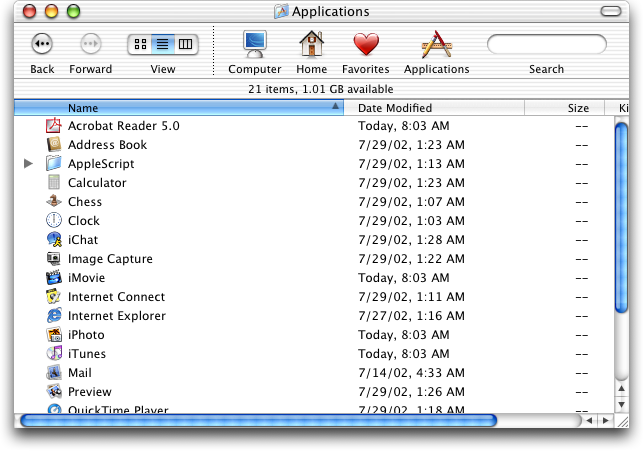

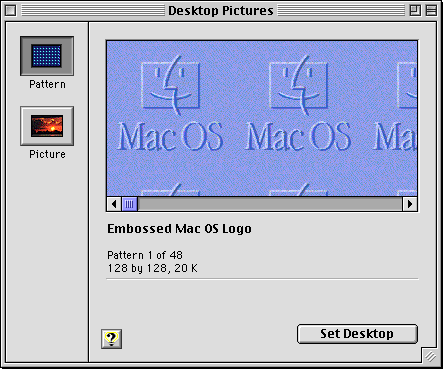
I swear, this reign of visual artists as dictators has to stop.
I'm sure people noticed this issue internally and brought it up but some thing by some designer was seen as biblically sacred and overruled all reason.
I've been at companies were you get severely punished... sometimes fired for subordination for fixing an obviously broken spec by a designer emperor.
It's normal to be "I guess 2+2=5 here, whatever" as if the designer went in a tiny room, had a seance with the divine...
Yo, newsflash, everyone makes mistakes. Failure is when you force them to stay uncorrected.