AkelaA 2 days ago

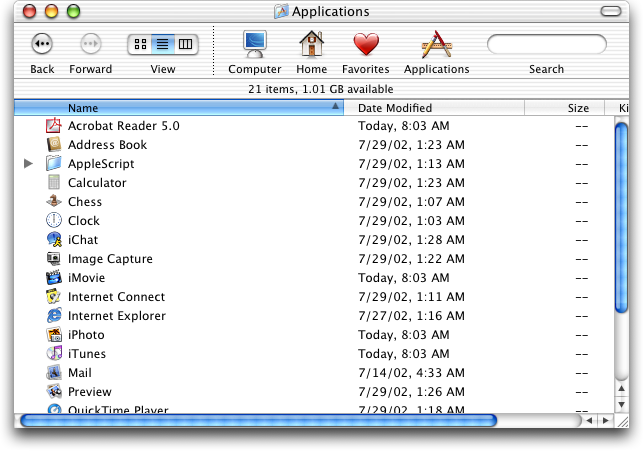
It also - as seen in that screenshot, had large, always visible scrollbars where it was easy to see how far down you were in a folder or document, and could easily click and drag to scroll to where you needed. Now in the service of minimalism we have scrollbars that consist of a thin, semi-transparent line that fades out after half a second and is nearly impossible to click and drag due to how small it is.

  • consp a day ago

    The scrollbar thing is a more widespread mess. I've seen plenty of apps (cross platform) which hide the scrollbar as a tiny grey bar only visible when scrolling. Which on some TN panels is neigh invisible... If I can't see the scrollbar there is no additional stuff to read. I'm now pretty sure this is apple's bad design leaking though to the rest of the world.

    • concinds a day ago

      Apple scrollbars have never looked uglier. I would prefer them to always show but they're so ugly I keep it default. On Aqua they looked great! On Windows they're still great!

  • masklinn 2 days ago

    > Now in the service of minimalism we have scrollbars that consist of a thin, semi-transparent line that fades out after half a second and is nearly impossible to click and drag due to how small it is.

    You can make them always on still. I've done so ever since their disappearing act started. It's not even much hidden, it's in the "Appearance" setting pane.

    • Lammy 2 days ago

      They're still too small and too light. Some times when a document is big enough I'm actually not able to find the scroll thumb on macOS Sequoia. Some times wiggling the scroll thumb around by scrolling slightly back and forth with my mousewheel/trackpad helps to make it visually appear, but other times I just have to give up.

      • IshKebab 2 days ago

        Also I've noticed sometimes things don't even work correctly with "always on". Some developers don't test it because it's not the default.

        • Wowfunhappy 2 days ago

          These developers also haven't bothered to test with any mouse other than an Apple Trackpad, which turns the scrollbars on by default.

          Of course we all make mistakes, but anyone who has made this mistake should really fix it!

  • bsimpson 2 days ago

    The default modality changed.

    Classic Macs were designed for the mouse or trackball. Modern Macs are designed for multitouch scrolling. When it's easy to get the scrolling infrastructure on demand, the desktop might not need the same click-first affordances.

    • userbinator 2 days ago

      You're missing the fact that the scrollbars also indicate where you are in their range, which is important regardless of how you do the scrolling itself.

      • bschwindHN a day ago

        I think their point also covers this - since it's so easy to scroll, you can always just do a little two finger scroll wiggle to have it appear and see where you are. And that's only if you haven't configured it to always display.

  • quitit a day ago

    If one chooses "Always" under the "Show scroll bars" option on the Appearance System Settings panel. They will be rewarded with thick*, always-on scroll bars that do not disappear.

    *They're the same thickness as Aqua.

  • zahlman 14 hours ago

    > Now in the service of minimalism we have scrollbars that consist of a thin, semi-transparent line that fades out after half a second and is nearly impossible to click and drag due to how small it is.

    This is endemic now. Cinnamon does it by default and I hate it. I only managed a partial fix, and then I had to do more work per-app (especially Firefox) to make them behave.

npunt 2 days ago

In the Aqua image the big bright blue scrollbars stand out far, far more than the content. That sucks, honestly. So does the percentage of the screen dedicated to their presence.

Also, horizontal scrollbars suck. One thing later versions of Finder did well was adjust columns to minimize the presence of them.

We just don't need UI that big anymore. These days our cursors are much more accurate, from the magical Mac trackpad to high DPI optical mice, and we're 40+ years into GUIs so the limited number of people who opt-in to a full computing experience can already be expected to know the basics.

Yes Tahoe sucks, but going back to Aqua or classic MacOS would also suck, just in a different direction. If you actually spend time using classic MacOS and Aqua these days, man is it frustrating to get basic things done. Everything is so slow and you're constantly resizing windows to see whats in them. I own several Macs from the 80s-00s and they are really in need of many quality of life updates that later MacOS revs added. On a modern Mac, enabling 'show scrollbars' gets you to a pretty optimal Finder experience, minus all the stupid Mac bugs and Tahoe nonsense like this article points out.

  • zwischenzug a day ago

    Hard disagree with all of this. I feel like I am constantly lamenting the simplicity and usability of old scrollbars and cursing their will o the wisp modern implementations.

    Scrollbars used to be invisible to me. They only bubbled up to my consciousness when I needed them, and then there was no friction in their use. Now I am having to think about them constantly. To me that is 'standing out'.

  • Wyverald 2 days ago

    Very much agree. Nostalgia is a hell of a drug. Not saying GP's opinion was pure nostalgia, but a lot of people certainly selectively remember only the good parts as they complain about the now.

  • Wowfunhappy 20 hours ago

    I actually don't think there's anything wrong with horizontal scrollbars, as long as you're using an input device (like an Apple trackpad) that makes it equally easy to scroll either axis.

masklinn 2 days ago

It should be noted the drag handle was removed back in Lion. And the square cutout was removed in Panther, both of which were iterations of Aqua.

(and yes Lion was garbage, first upgrade I skipped since Tiger, and definitely the first "what the fuck are they doing").

  • zapzupnz 2 days ago

    Going back to Lion would almost feel like bliss compared to Tahoe. Hell, bliss compared to Big Sur.

Wowfunhappy 2 days ago

Note that downside: you could only resize from that bottom right corner, not from any other edge!

I do think that was better overall, and it's something I miss about Snow Leopard, but I can see why they changed it.

  • oneeyedpigeon a day ago

    I don't see what's wrong with both, or even whatever combination you choose to configure.

  • leptons a day ago

    >Note that downside: you could only resize from that bottom right corner, not from any other edge!

    This was one of the worst things about MacOS and why they lost me as a user early on. I used to be a Mac Sysadmin for 3 years, and the awful window system (and Finder) made it a living hell. I still don't find much to like about the GUI part of MacOS.

AlienRobot 2 days ago

Windows also used to have a "grip" indicator. Nowadays I only see this in resziable textboxes in browsers...

  • TonyTrapp a day ago

    To be fair, this grip indicator only (and still) exists when the window has a status bar. It's part of the Windows status bar design, not of the window design. Of course, many more applications used to have status bars than they do now, so that's why you see it less often.

    • Lammy a day ago

      > To be fair, this grip indicator only (and still) exists when the window has a status bar.

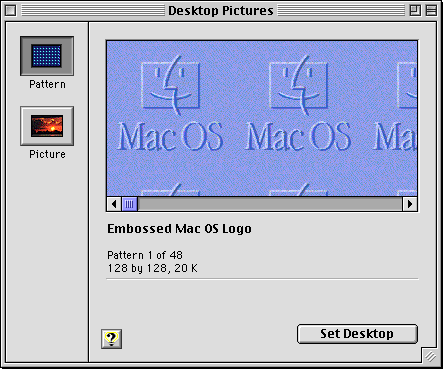
      Here's a resizable window in Platinum that has a drag handle but does not have a status bar: https://guidebookgallery.org/pics/gui/settings/appearance/ma...

      edit: I missed "Windows" in GP comment. Well let it be known that at least Platinum wasn't like this :)

    • AlienRobot a day ago

      What's up with that, anyway? Statusbars are great. They are one of the most useful parts of the window.

WillPostForFood 2 days ago

Better in that it was clear, but worse that you had to resize from the bottom right. Made expanding to the left, or up, very annoying. I'd take the current situation over this.

  • Lammy 2 days ago

    True, but not a 1:1 comparison, because Classic Mac OS windows were much better at staying where you put them, even between sessions. John Siracusa wrote a lot about how this was missing from Mac OS X: https://arstechnica.com/gadgets/2003/04/finder/

    • Wowfunhappy 2 days ago

      People also didn't regularly plug classic Macs into external monitors, changing the screen resolution temporarily.

      For this and many other reasons, I just don't think the paradigm would work today. It's philosophically smart but limiting in too many other ways.

      • Lammy 2 days ago

        Yeah that is also true. I have had that experience with certain CD-ROMs (maybe like two or three ever but has happened) on my PowerBook 2400c. If the authoring machine had a higher display resolution than my machine, and the author had the writable disc image's window open to a place outside my screen resolution, and the window positions got saved to the DesktopDB/DesktopDF, and the DesktopDB/DesktopDF got written to the CD-ROM, then it would open in the position outside my screen resolution every time my own DesktopDB/DesktopDF got erased. One particular artist's CD-ROM is completely outside of it which annoys me every time.

        Relevant TA: https://web.archive.org/web/20090625152558/http://support.ap...

oneeyedpigeon a day ago

Yeah, but scrollbars are bad and every bathwater has its baby.

(P.S. scrollbars aren't even bad)

skdjejdjwjdj a day ago

Man, I love platinum. I know the internet favours Aqua by a wide margin (and fairly so, it is gorgeous), but something about platinum just feels right to me.

BenFranklin100 a day ago

Great comment. I had forgotten how much better things were in terms of visual indicators. Slick looking design should never come at the expense of usability.

mihaaly a day ago

Why did they stop this?

It was parctical (just like clearly visible scrollbars).

And my conviction is that computers are for practical and not the pretty things primarily. Can be pretty but not on the expense of usability. This last one is increasingly and sadly untrue nowadays!